Full Set — Arming Your System
Your system may be programmed to work without a User Menu. In which case, when you leave home you need to fully arm ("set") your alarm system so that all zones are protected. Full Set uses an exit timer to give you time to leave the building.
Full Set With Exit Timer
This is the most common method. After you arm the system, a countdown timer gives you time to leave the building before the alarm becomes active.
Steps
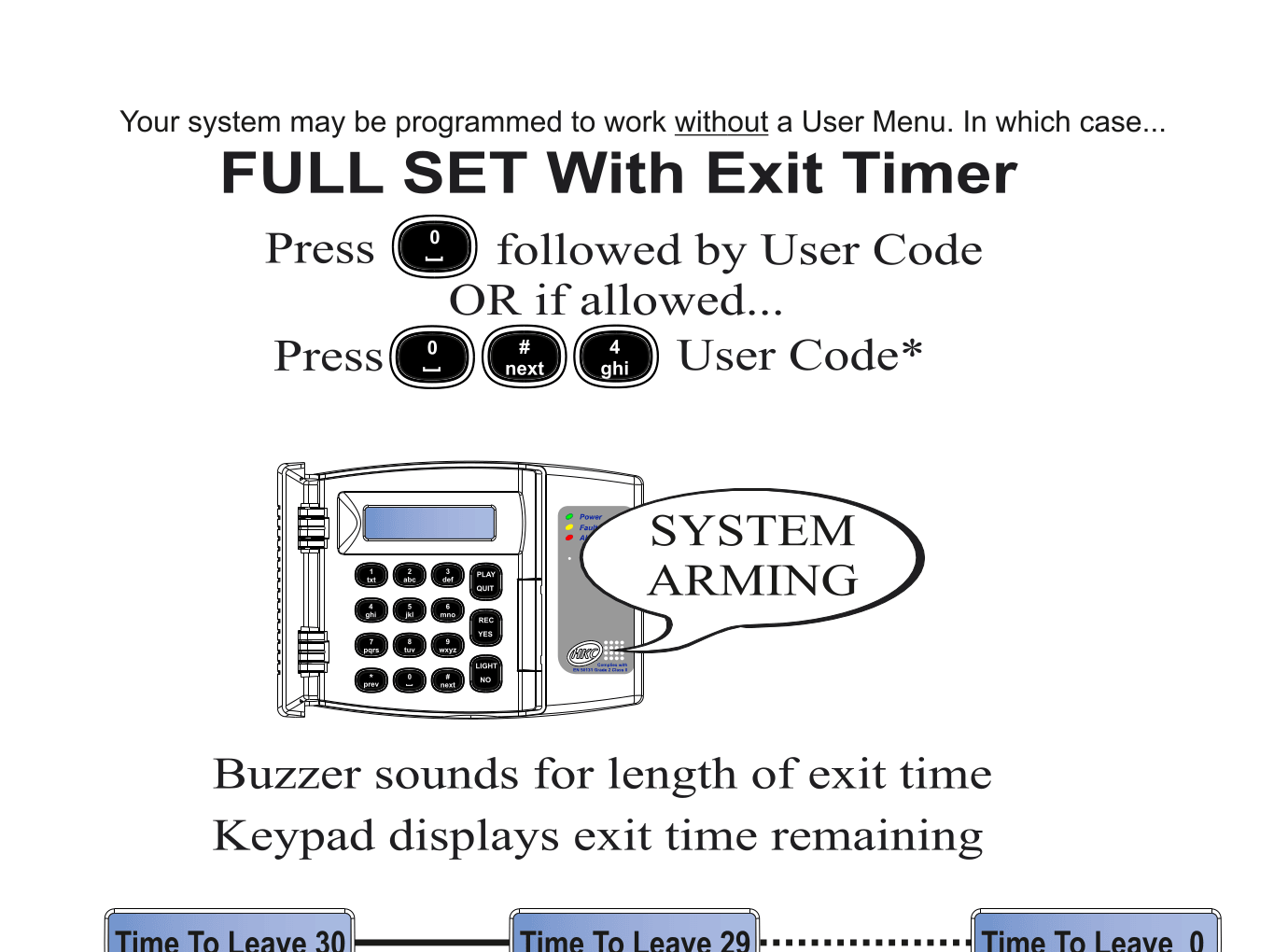
- Press 0 followed by your User Code
- Or, if Quick Codes are enabled: Press 0 # 4 followed by your User Code
- The keypad displays "SYSTEM ARMING"
- A buzzer sounds for the duration of the exit time
- The keypad counts down: Time To Leave 30 ... 29 ... 28 ... all the way to 0
- Once the countdown reaches zero, your system is fully armed
tip
Leave the building promptly during the exit countdown. If you re-enter a protected zone before the countdown ends, the alarm may trigger.
EN 50131
Quick Code with User Code is an EN 50131 requirement.
Need to arm without an exit timer?
If you don't need a countdown — for example, you're already outside or using an external keypad — see Quick Arm (No Exit Timer) for instant arming.